
STEP 3
Select the Right WordPress® Platform Theme
Things to Consider:
- Choose a theme that aligns with your websites purpose
- Ensure the theme is responsive, mobile-friendly.
- Select a theme that is regularly updated for security and compatibility and offers documentation for support.
- Check user reviews and ratings
- Determine if a free theme meets your needs or if a premium theme is worth the investment.
Free vs Paid WordPress Themes
WordPress Themes offer both free and paid themes, each with distinct advantages. Free themes provide a cost-effective starting point for websites, often with basic customization options and designs suitable for simple blogs or personal sites. However, they may lack advanced features, regular updates, and dedicated support. Paid themes, on the other hand, typically offer more sophisticated designs, extensive customization capabilities, and premium features like page builders or e-commerce integration. They also come with regular updates and professional support, making them a preferred choice for businesses and complex websites. While paid themes require an initial investment, they often provide better value in terms of functionality, security, and long-term maintenance.
Why Choose The Divi Theme
I've been designing webistes for over 15 years and it wasn't until I discovered the Divi theme by Elegant Themes, 10 years ago, that I started building the websites myself. Previously I would rely on a programmer or webmaster to write the code to fit my designs. This process came with a lot of back and forth messaging just to make minor adjustments because something would always get lost in translation between my design and the html code, Programmers are not designers.
The Divi theme allowed me to create my own sites without knowing anything about coding. It is in my opinion the best WordPress theme on the market becuase of its versitilty and intuitive interface. I've watched this theme grow a lot over the past decade. The Divi team are always adding new features and tools, and are continualy making security and performance updates. When I started with Divi there was plenty of support through their website but now becuase of its popularity there are a plethera of YouTube videos to guide you through each aspect of the Theme.
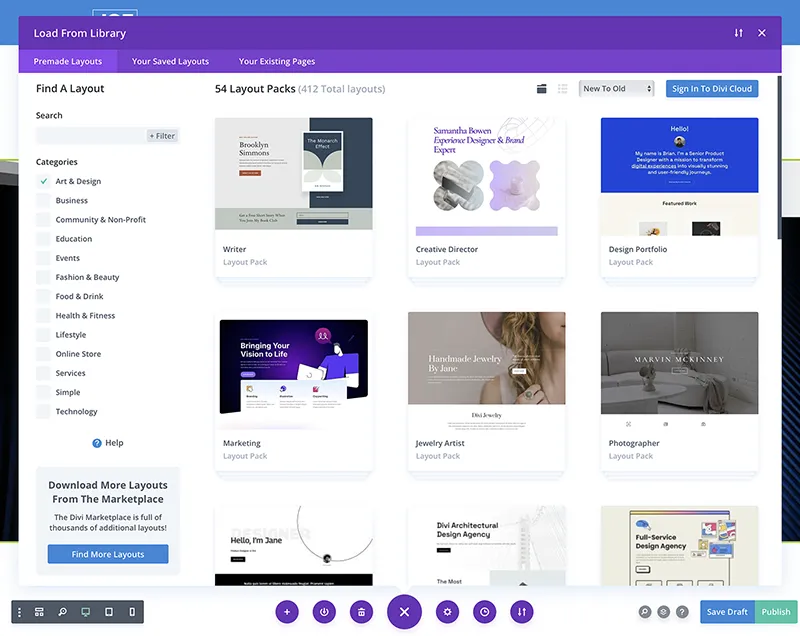
The Divi theme allows you to create and build out just about any website you can imagine. You are not bound by a rigid template like the DIY builders or having to write any code. For a graphic designer like myself it has been an amazing tool allowing me to create my vision for a web page. However, Divi offers a huge selection of beautiful premade templates which are free to use with your membership.

The Divi Theme
The Divi WordPress theme by Elegant Themes is renowned for its versatility and comprehensive features, making it a powerful choice for creating visually stunning and highly functional websites. With its intuitive drag-and-drop page builder, Divi empowers users to design and customize every aspect of their website without the need for extensive coding knowledge.
This theme offers an extensive library of pre-designed layouts, modules, and customizable elements, allowing users to create unique and engaging designs tailored to their specific requirements. Divi's responsive framework ensures that websites built with this theme adapt seamlessly to various devices and screen sizes, providing an optimal user experience across platforms.
Furthermore, Divi integrates seamlessly with a wide range of third-party plugins and tools, extending its capabilities and enabling users to incorporate advanced functionalities like e-commerce, membership portals, and custom applications. Whether you're building a simple portfolio site, a corporate website, or a complex online marketplace, Divi's versatility and robust feature set make it an excellent choice for creating modern, visually appealing, and highly functional websites.
Free is not Free
Using a Free WordPress theme usually means you'll need to add a lot of plugins to get your site to work the way you want to. Most plugins come with a free version but to use the full version comes at a price. The more plugins the slower the performance. Free also means you'll need to know how to generate some html and CSS code if you want your site to stand out against others. If you don't want to bother with all that then just purchase the Divi theme or have it installed. It's worth the investment. The Divi theme allivieates the need to write code or add a lot of plugins.
Divi UI
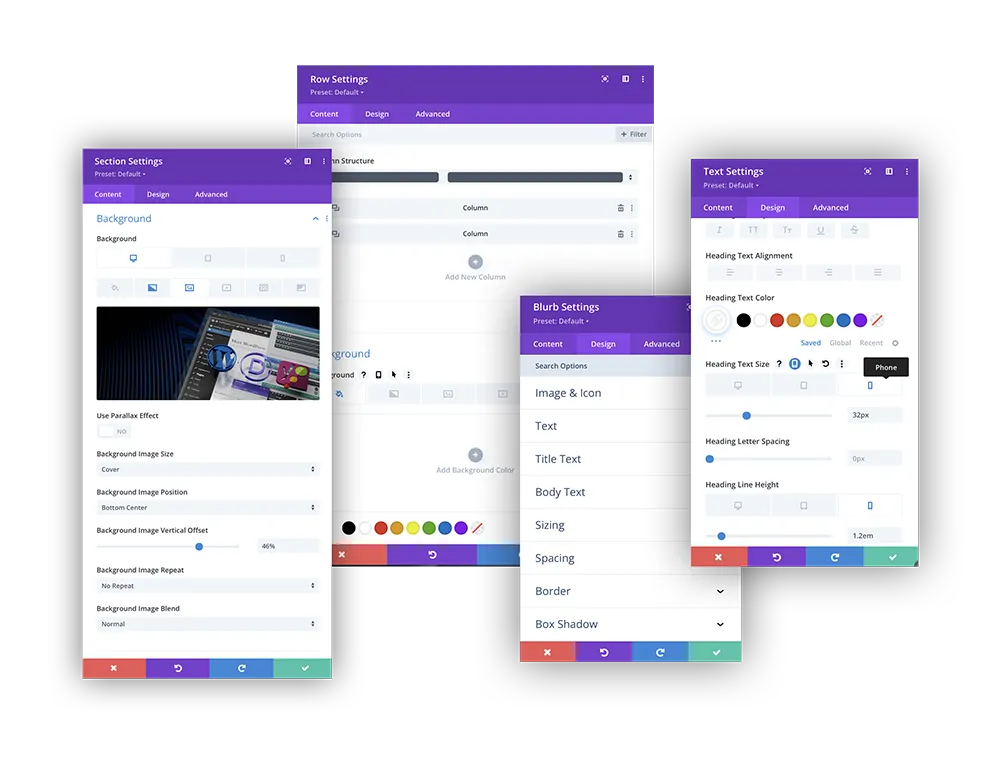
The Divi UI is so easy and intuitive. Simply click on the Section, row, or module you want to edit and you'll get a dialog box with all the settings you can adjust as it relates to the element you selected.
The amount of control Divi gives you is amazing, from creating hover effects, scroll effects and animation, all can be added and controlled through the simple and easy to use interface. Any effects that you see on this site were created using the Divi theme without writing one bit of code.
No Coding Necessary
It is true that you can build a site like this one without any coding knowlege, but if you really want to do yourself a favor and take the time to learn the very basics of how html, CSS and Javascript work together. There will come a time when you will want to implement some CSS code to make something look or function in a particular way. That's when it's nice to have a basic understanding of the code especially CSS. A great place to start is W3C it's free and probably all you'll ever need.
I rarely have to add any CSS code, but every page, section, row and module in the Divi theme has an area where you can add custom CSS code just to that module, if needed. Just another reason I love the Divi Theme.
Have Questions?
Please contact me directly.
Free Consulting is just a phone call away.
904-501-9526
Ask for JOE
STEP 4
Install Essential Plugins